Optimizing Local LLMs on Apple Silicon / EP02
Why Even a 128GB Mac Can Run Out of Memory
Model weights are only part of a 128GB Mac’s memory budget. I mapped out KV caches, runtime allocations, development tools, and which models might stay loaded.
In this post
- Surely 128GB buys me some breathing room
- The model file needs company
- Longer conversations need room beyond the weights
- Two models and two conversations are different problems
- Do all the models need to stay loaded?
- Read the labels before adding memory numbers
- When it arrives, change one thing at a time
- What I haven’t measured
Surely 128GB buys me some breathing room
The number that caught my eye when ordering the Mac Studio was 128GB. My current iMac has 8GB. Surely that would mean fewer interruptions over memory, at least for a while.
In EP01, I split slow LLM responses into prefill and decode. This time the question comes even earlier: will everything fit at all?
At first I looked at model download sizes. But chatting with one big model isn’t all I want to do. I’d like a language model available for Hermes, plus image and audio models when needed. I’ll also be building apps and running simulators beside them.
Written out like that, I’m asking quite a lot of those 128GB. The Mac Studio is still on order. This is a note about what to check when it arrives, rather than a report that I’ve already run out of memory.
The model file needs company
A model file mainly holds weights and data required by its storage format. Running it also needs a KV cache, intermediate results, temporary working space and runtime allocations. The Transformer inference analysis distinguishes weights from data used during execution.
Separating the budget makes it easier to see where to leave room. These numbers illustrate one allocation of 128GB; they are not requirements calculated for selected models.
One way to budget 128GB
Illustrative budget · not measured scenario comparisons
| Category | GB | % |
|---|---|---|
| macOS and dev tools | 20 | 15.6 |
| Base LLM weights, etc. | 28 | 21.9 |
| Vision, image and audio models | 32 | 25.0 |
| KV cache and working space | 16 | 12.5 |
| Headroom | 32 | 25.0 |
| Total | 128 | 100 |
This graph is an illustrative memory budget, not a measurement. Actual usage depends on the model, context length, runtime and concurrent work.
The 32GB headroom is capacity intended to remain unused, not reserved or occupied memory. Categories are not fixed requirements. OS, weights, KV cache and runtime cache can interact; measured counters must not simply be added together.
How the task changes the plan
Expand each scenario for its setup and allocation principle. The numbers above are not A/B/C requirements. Models, quantization, context and runtimes are undecided; numerical scenario comparisons await measurements after delivery.
A · Everyday operation
Hermes · medium general LLM · JevMLX · dev tools · small speech model
Keep frequent language and decision models resident first, with room for development. Check Hermes and tool overhead too.
B · Multimodal work
Medium general LLM · vision · image generation · audio models · dev tools
Load models in task order rather than all at once. Include peak activation and working-buffer memory during generation.
C · Large LLM run
Large Qwen or DeepSeek candidate · weights and KV cache · macOS/runtime · minimal other resident models
Reduce other models first, then check total weights, context and working space. MoE active parameters alone do not establish whether it fits.
Apple Silicon’s unified memory is shared by CPU and GPU. MLX explains that both can work on the same arrays. Avoiding transfers into separate VRAM helps, but macOS and other apps need space in that same memory too.
“128GB Mac, therefore a 128GB model” leaves things out. Weights aren’t the whole budget, and the system needs headroom. Metal also exposes a recommended working-set size. I won’t treat installed capacity as the amount safely available to GPU work.
I also need to distinguish dense models from MoE. A dense model generally uses most of its weights for each token; MoE selects some experts. MoE reports therefore separate total parameters from active parameters involved in each token’s computation. Fewer active parameters don’t remove the memory cost of all expert weights if those weights remain resident.
Streaming the required experts from SSD can reduce residency, but adds I/O to read and move them. Whether a usable implementation exists for my Mac is a separate question. I’ll explore this in EP04.
Longer conversations need room beyond the weights
A KV cache keeps previously calculated keys and values for reuse. For conventional full attention, more retained tokens mean more stored data. The cache implementation may grow allocations as needed or reserve a maximum size ahead of time.
For a simple case, the payload is approximately:
KV bytes ≈ 2 (K and V) × layers × KV heads × head dimension × retained tokens × bytes per element
The diagram assumes 32 layers, 8 KV heads, head dimension 128, two bytes per element and one session. This is arithmetic for an imaginary configuration, not a particular Qwen model or a measurement from my ordered Mac. Buffer headroom and metadata are excluded.
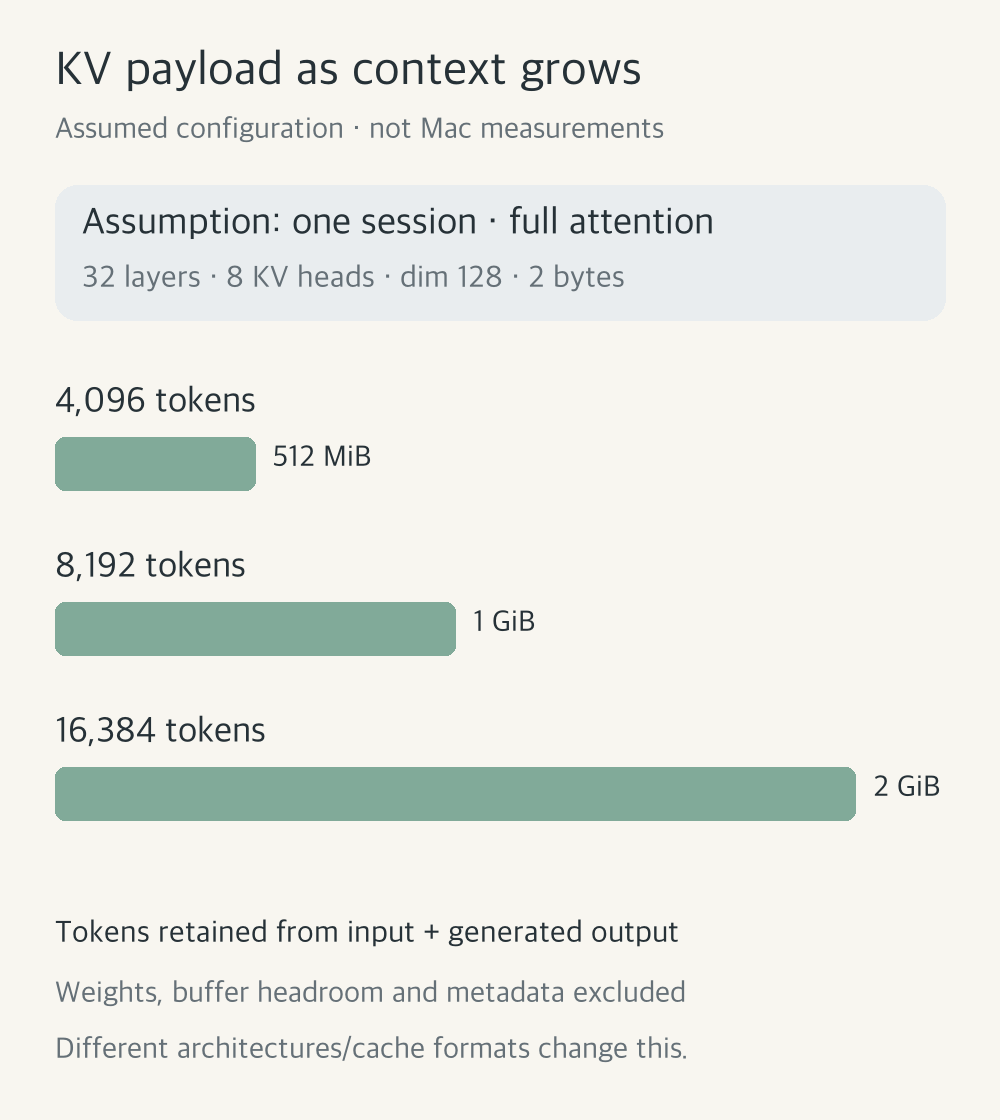
This formula isn’t universal. GQA shares KV heads across query heads; MQA shares a single KV head. With other conditions equal, fewer KV heads mean less stored data. Sliding-window layers can limit cache growth, and hybrid models can use different state structures across layers. I need the actual configuration, not just the model’s name.
Four-bit weights don’t automatically mean a four-bit KV cache either. Cache quantization has its own support and settings. FP16 uses two bytes per element and FP8 one, but storage may also need data such as scales. The vLLM FP8 KV guide documents supported combinations; that does not establish support in a Mac runtime. Download size alone won’t tell me whether long conversations will fit.
Two models and two conversations are different problems
Two conversations with one model don’t necessarily require two copies of its weights. An engine such as the llama.cpp server can serve multiple requests. Per-session state and cache space still matter. Shared prefixes and allocation policies depend on the implementation.
Launching separate model processes doesn’t automatically provide the sharing of one engine. Two different models also bring their own weights and working allocations.
| What increases | Memory to check |
|---|---|
| One conversation’s length | KV cache and other conversation state |
| Concurrent sessions | Session state, batch workspace and actual sharing |
| Different loaded models | Each model’s weights, caches and working space |
| Dev tools and simulators | System headroom and memory pressure |
I’m also curious about long Hermes conversations containing tool results. A short question from me might become a much longer model input. I’ll need to record the tokens actually sent.
Do all the models need to stay loaded?
I’m considering a medium general LLM and a small decision model such as JevMLX for frequent use, with STT or embeddings added as needed. Large LLM candidates such as Qwen3.8 Flash Next, plus image, video and music generation models, would load on demand. Candidate names, actual versions and memory requirements still need confirmation. I don’t plan to keep them all loaded at once.
Image and video generation need more than room for weights. Activations and working buffers can grow during inference, and task conditions such as resolution or frame count affect the peak. I’ll use the Diffusers memory guide as a reference, then check the runtime I actually use. Large tasks may require unloading another model first.
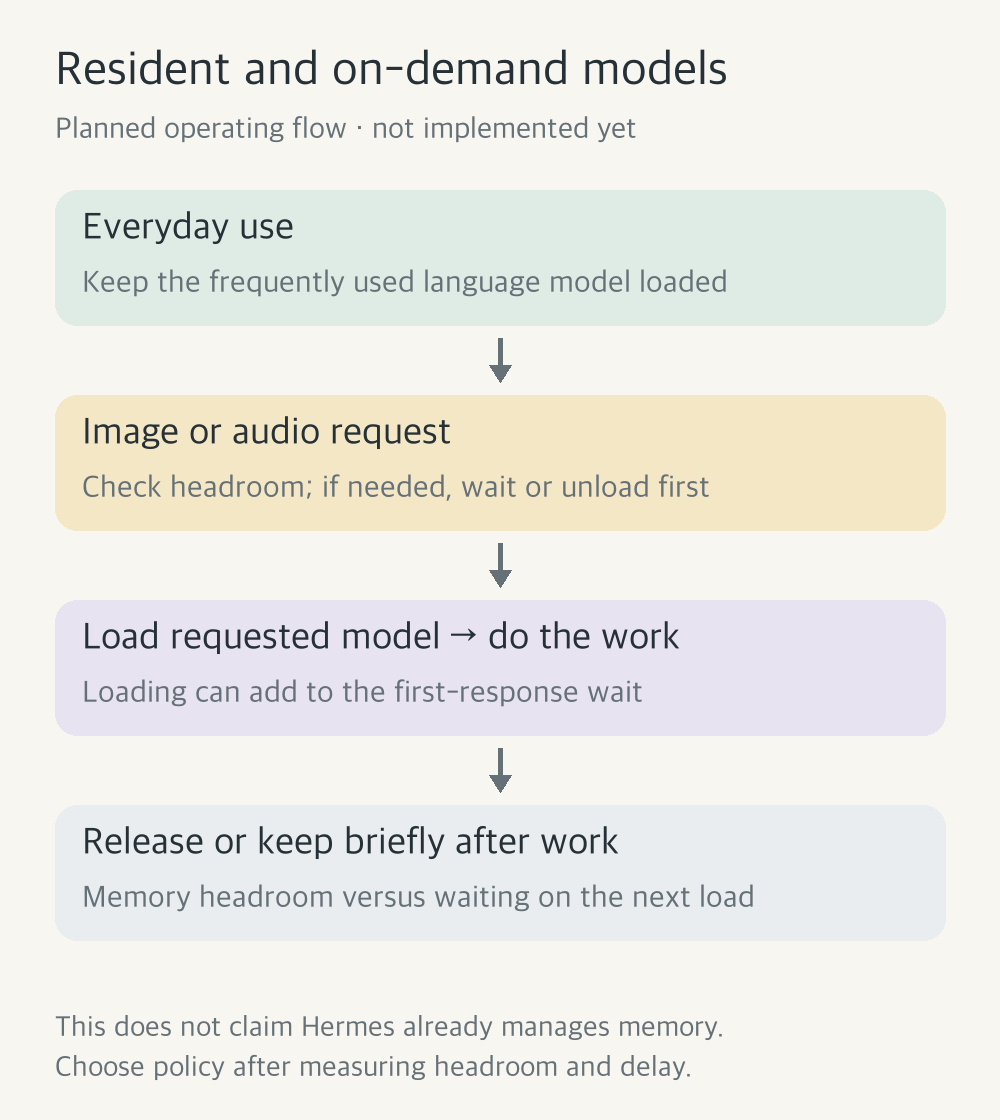
Saving memory means the first request may wait for loading. Whether I unload immediately or keep a model around briefly will depend on frequency and load time. A file on SSD isn’t the same as a model ready in memory.
This is still an operating plan. Alongside “how many can stay loaded?”, I want to know “how long does bringing one back take?”
Read the labels before adding memory numbers
I plan to use Activity Monitor alongside runtime counters. Apple’s guide says memory pressure reflects free memory, swap rate, wired memory and file cache. Rather than only checking how much memory is used, I want to track memory pressure, swap and any response slowdown as conversations get longer.
MLX exposes active memory, peak memory and allocator cache. Allocator cache holds space for later allocations; it isn’t the conversation’s KV cache.
Adding process memory to MLX counters can double-count space. MLX’s peak isn’t the whole system’s unified-memory peak either. OS file cache left after unloading also needs a separate interpretation.
When it arrives, change one thing at a time
Launching several models and a simulator immediately would make changes hard to explain. I’ll fix model, quantization and runtime versions, then work through these conditions.
| Order | Change | Record alongside it |
|---|---|---|
| 1 | Input length with one model | Actual tokens, KV settings, memory and response changes |
| 2 | Concurrent sessions for that model | Per-session length, batch settings, delays and sharing |
| 3 | Add a second model | Load time, actual concurrency, peak and post-release state |
| 4 | Add dev tools and simulators | Quiet conditions versus my normal development session |
I’d like to capture loading, first response, generation, idle time and release separately. Alongside EP01’s TTFT, prefill and decode metrics, I’ll watch pressure, compression and swap changes. Keeping app development comfortable matters more to me than deliberately pushing the machine to its limit.
What I haven’t measured
I don’t yet know which models will fit comfortably, or what happens with image and audio models alongside them. The arithmetic is arithmetic; the diagrams describe a plan. Actual usage and speed have to wait for the machine.
Initially I wanted to load the biggest model possible. Now I’d be happy to leave a useful everyday model running while building apps comfortably, and bring out the large one when needed.
Even if everything fits, slow answers will raise another question. In EP03 I’ll look at how speculative decoding and MTP try to shorten that wait.